
 View on Asset Store (opens in new tab)
Package details
- Latest version
- 1.0
- Last updated
- First released
- Unity version
- 2018.3.5 or later
- Package size
- 2.8 MB
- Files
- 66
- Favorites
- 45
- Views in the past week
- 5
Price tracking
- Last checked
- Tracked since
- Lowest recorded
- $4.99 on
Battle with ships Game 3D
Price $4.99
Buy on Asset Store (opens in new tab)
Affiliate link · Purchases support this site
Price history
Last 6 months
USDAsset preview
1 / 6

Battle with ships Game 3D screenshot 1


About this asset
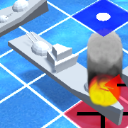
With this addictive package you will be able to recreate a futuristic battleship game in which the objective is to sink the enemy ships by launching several missiles to the unknown enemy zone. After each try the grid will show if you have missed or hit an objective. When all the ships are destroyed the game ends.
This package includes the following features:
• 3D ship models.
• Camera movement, zoom and rotation.
• Game manager that shows several canvases with instructions.
• Missile generation, movement and management.
• Impact management in water and in ships with different markers.
• Transparent and friendly-code.
• Water simple dynamics.
• Boat floating effect.
Game description
-----------------------------
• Player 1 places his boats. Thanks to the colliders, we are able to know when the boats are misplaced or overlap other ships. Boats are placed by clicking on the grid and rotating the boat in the four possible directions. A magenta line will appear around the ship.
• Player 2 places hisboats. Same process as shown before but this time it is player 2 who places the boats in the screen.
• Player 1 turn. The player can select a square from the enemy grid and it will show the “shooting button”. Once pressed, the missile will launch.If the player hit the water a blue marker will stay over the grid, while a red marker will appear if the player hits an enemy boat.
• Player 2 turn. The player can select a square from the enemy grid and it will show the “shooting button”. Once pressed, the missile will launch. Same process than in player 1. In this case the player can check the state of his boats on the grid.
Contact at:
[email protected]
This package includes the following features:
• 3D ship models.
• Camera movement, zoom and rotation.
• Game manager that shows several canvases with instructions.
• Missile generation, movement and management.
• Impact management in water and in ships with different markers.
• Transparent and friendly-code.
• Water simple dynamics.
• Boat floating effect.
Game description
-----------------------------
• Player 1 places his boats. Thanks to the colliders, we are able to know when the boats are misplaced or overlap other ships. Boats are placed by clicking on the grid and rotating the boat in the four possible directions. A magenta line will appear around the ship.
• Player 2 places hisboats. Same process as shown before but this time it is player 2 who places the boats in the screen.
• Player 1 turn. The player can select a square from the enemy grid and it will show the “shooting button”. Once pressed, the missile will launch.If the player hit the water a blue marker will stay over the grid, while a red marker will appear if the player hits an enemy boat.
• Player 2 turn. The player can select a square from the enemy grid and it will show the “shooting button”. Once pressed, the missile will launch. Same process than in player 1. In this case the player can check the state of his boats on the grid.
Contact at:
[email protected]
From the publisher's Asset Store listing.