
 View on Asset Store (opens in new tab)
Package details
- Latest version
- 1.0
- Last updated
- First released
- Unity version
- 2018.3.5 or later
- Package size
- 919 KB
- Files
- 10
- Favorites
- 11
- Views in the past week
- 1
Price tracking
- Last checked
- Tracked since
- Lowest recorded
- $5.00 on

Multi wall materials
- Price drop
Discount -67%
Previous price
$14.99
Price $5.00
Lowest recorded price
Get 67% off on Asset Store (opens in new tab)Affiliate link · Purchases support this site
Price history
Last 6 months
USDAsset preview
1 / 14

Multi wall materials screenshot 1


About this asset
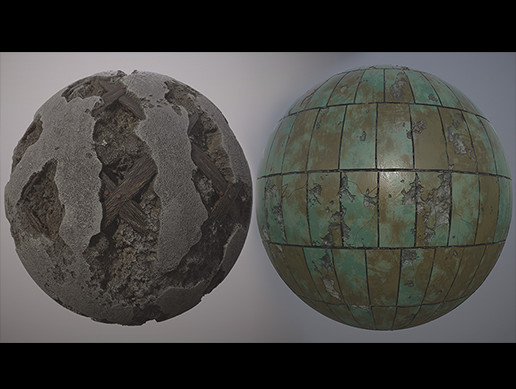
Multi-wall materials were made in the substance designer. The multi-material package includes various settings that will help you create many variations of materials. Description and view settings will be shown in the video. Render and animation were done in the marmoset toolbag.
When you start the scene materials are in the resolution of 1024x1024. This is done for faster work on instances. You can always change the resolution of the materials you need. Remember, if you are going to switch to 4096x4096 resolution, this will take longer to respond.
To set up materials, I used a free plugin from the substance designer.
When changing the settings, some of them work in small values, but you will immediately understand when you start to take off work.
Features:
• Multi wall materials
• Materials instance
Texture Resolutions: • 4096x4096
• 2048x2048
• 1024x1024
Number of Materials: 6 Multi materials
Do Materials derive from a Master Material with instances as variation: Yes
Supported Development Platforms: windows
Supported Target Build Platforms: windows
Link to documentation:
https://drive.google.com/open?id=1zjaNDmCxHzgHNYHm8_PXvmONJ6SVNI9T
When you start the scene materials are in the resolution of 1024x1024. This is done for faster work on instances. You can always change the resolution of the materials you need. Remember, if you are going to switch to 4096x4096 resolution, this will take longer to respond.
To set up materials, I used a free plugin from the substance designer.
When changing the settings, some of them work in small values, but you will immediately understand when you start to take off work.
Features:
• Multi wall materials
• Materials instance
Texture Resolutions: • 4096x4096
• 2048x2048
• 1024x1024
Number of Materials: 6 Multi materials
Do Materials derive from a Master Material with instances as variation: Yes
Supported Development Platforms: windows
Supported Target Build Platforms: windows
Link to documentation:
https://drive.google.com/open?id=1zjaNDmCxHzgHNYHm8_PXvmONJ6SVNI9T
From the publisher's Asset Store listing.