
 View on Asset Store (opens in new tab)
Package details
- Latest version
- 1.1
- Last updated
- First released
- Unity version
- 2017.1.0 or later
- Package size
- 1003 KB
- Files
- 70
- Favorites
- 110
- Views in the past week
- 12
Price tracking
- Last checked
- Tracked since
- Lowest recorded
- Free on

Hierarchy Dividers
Price Free
Get it free on Asset Store (opens in new tab)
Affiliate link · Purchases support this site
Price history
Last 6 months
USDAsset preview
1 / 3

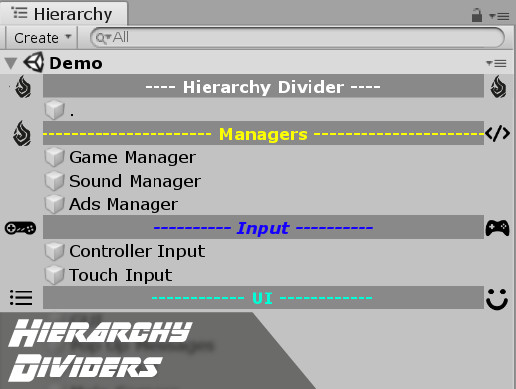
Hierarchy Dividers screenshot 1


About this asset
This little tool supports you on creating grouping objects in your hierarchy.
It's a common practice to create empty GameObjects and name them like "---- Environment ----" to organize stuff in your hierarchy.
This is actually better than abusing GameObject as 'folders' as it can have impact on performance and restricts you in your possibilities.
[❗️] But it can take quite a while to create these dividers and it's even more annoying to maintain them and repeat this process for every scene.
▶ So, relax and use this tool.
Create presets of neat dividers, sprinkle some pretty icons over them and place them in your hierarchy with just one click. Things will look nice and tidy.
If you change something in the preset, the configurator will try to replace matching dividers.
The dividers' tags are automatically set to 'Editor only' to exclude them from build.
And if you start a new project, just import your existing presets and start right ahead!
⭐ There's also a PRO version || ▶ Online Documentation
From the publisher's Asset Store listing.