
 View on Asset Store (opens in new tab)
Package details
- Latest version
- 1.0
- Last updated
- First released
- Unity version
- 2019.4.28 or later
- Package size
- 37.9 MB
- Files
- 117
- Favorites
- 13
- Views in the past week
- 1
Price tracking
- Last checked
- Tracked since
- Lowest recorded
- $4.99 on
Keywords
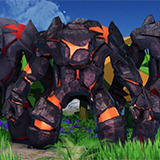
Lava Monster Asset Pack
The Lava Monster pack contains one model with nine different texture sets, including eight PBR sets and a hand-crafted stone set.
Affiliate link · Purchases support this site
Price history
Last 6 months
USDAsset preview
1 / 12

Lava Monster Asset Pack screenshot 1


About this asset
The Lava Monster pack contains one model with nine different texture sets, including eight PBR sets and a hand-crafted stone set. All textures are at 2048x 2048 resolution, providing an excellent visual presentation. The Model vert count is 6636, with five custom animations. The model is fully rigged, and UV unwrapped, allowing you to create your animations and so forth.
Animations Included are the following:
- Idle
- Walk
- RunOne
- RunTwo
- Left punch
- Right punch
Vert Count: 6636
Assets: One Model
Texture Sets: 9
Included are 9 prefabs already set up for you to get started straight away.
If you need any support, please don't hesitate to get in touch. Likewise, if you have any animation requests, please shout out.
Note: all additional environment models in the videos and screenshots are not included!
From the publisher's Asset Store listing.
Technical details
3D Model
LowPoly
2048x2048 textures
PBR
UV unwrapped
Five animations
Rigged
Compatibility
| Unity version | Built-in | URP | HDRP |
|---|---|---|---|
| 2019.4.28f1 | Compatible | Not listed | Not listed |
This asset is created in Unity's standard render pipeline. To use with other pipelines would require adjusting the shader settings. This can normally be performed when setting up the specific render pipeline.
As listed on the Asset Store.