
 View on Asset Store (opens in new tab)
Package details
- Latest version
- 2.1
- Last updated
- First released
- Unity version
- 5.6.0 or later
- Package size
- 1.2 MB
- Files
- 95
- Favorites
- 56
- Views in the past week
- 10
Price tracking
- Last checked
- Tracked since
- Lowest recorded
- $12.00 on
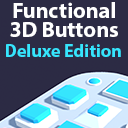
Simple Animated Functional 3D Buttons - Deluxe Edition [Mobile, AR & PC Ready]
Price $12.00
Buy on Asset Store (opens in new tab)
Affiliate link · Purchases support this site
Price history
Last 6 months
USDAsset preview
1 / 3

Simple Animated Functional 3D Buttons - Deluxe Edition [Mobile, AR & PC Ready] screenshot 1


About this asset
DELUXE EDITION v2.0
Takes 1 minutes to setup. Easy Button Prefabs and a complete and ready-to-use Touch/Mouse input system.
The buttons are create to simulate the same easy and simple setup as the built in Unity Canvas buttons; add them to the project, set up the visual properties, and finally set the methods and when to trigger them.
Easy to understand user guide inlcuded
Youtube Setup Video: https://www.youtube.com/watch?v=n47AEUgtXUU
The 3 Method Unity Event Tabs The buttons allow for 3 different states to be triggered;
OnPress: Gets fired immediately upon the user pressing the button (I.e. the raycast hitting the button's collider. This only gets fired once per button click.
OnStay: Gets fired every frame that the user keeps his finger on the button
OnLeave: Gets fired once the user takes the finger off the button, by either repositioning the touch/mouse position to no longer be over the button, or ends the touch/mouse button press.
Takes 1 minutes to setup. Easy Button Prefabs and a complete and ready-to-use Touch/Mouse input system.
The buttons are create to simulate the same easy and simple setup as the built in Unity Canvas buttons; add them to the project, set up the visual properties, and finally set the methods and when to trigger them.
Easy to understand user guide inlcuded
Youtube Setup Video: https://www.youtube.com/watch?v=n47AEUgtXUU
The 3 Method Unity Event Tabs The buttons allow for 3 different states to be triggered;
OnPress: Gets fired immediately upon the user pressing the button (I.e. the raycast hitting the button's collider. This only gets fired once per button click.
OnStay: Gets fired every frame that the user keeps his finger on the button
OnLeave: Gets fired once the user takes the finger off the button, by either repositioning the touch/mouse position to no longer be over the button, or ends the touch/mouse button press.
From the publisher's Asset Store listing.