
 View on Asset Store (opens in new tab)
Package details
- Latest version
- 1.0
- Last updated
- First released
- Unity version
- 5.6.3 or later
- Package size
- 753 KB
- Files
- 35
- Favorites
- 450
- Views in the past week
- 27
Price tracking
- Last checked
- Tracked since
- Lowest recorded
- Free on
Keywords
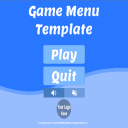
Game Menu Template
- Price drop
Affiliate link · Purchases support this site
Price history
Last 6 months
USDAsset preview
1 / 6

Game Menu Template screenshot 1


About this asset
Now over 1,000 downloads!!!!
Includes custom scripts, commented code, examples, and more!
Alpaca Studio’s Game Menu Template provides users with a cross-platform, customizable game menu made with Unity’s UI System.
Features:
-Custom Scripts
-Editable Buttons, Backgrounds, and Text
-Cross-Platform Functionality
-Easy Implementation
-Global Muting Methods
Features (Continued):
-Menu Controller to handle button events.
-A dynamic Music Player with a drag and droppable prefab.
-Custom button sprites.
-Public Domain fonts and audio files.
Tutorial:
1) Drag 'Menu_Canvas_Mobile' or 'Menu_Canvas_Standalone' into a new scene.
2) Open the object named '_Main' in the inspector and set the 'Scene To Load On Play' variable to the name of the scene you wish to load on Play button events.
3) Next set the 'Webpage URL' variable to your websites URL.
4) Find the 'Branding' object and open it in the inspector.
5) Set the 'Sprite' variable of the 'Image Component' to your company or organizations logo.
6) Now select the 'Copyright' object and change the COMPANY NAME value in the text-box to your company or organizations name.
7) Attach the 'Sound_Controller.cs' script to every object that contains an Audio Source component in your project.
8) Save your scene, press CTRL+SHIFT+B and click 'Add Open Scenes'.
- Optional: Open '_MusicPlayer' and then add more audio clips to the '_audioTracks' array in the 'Music_Player'. This handles all your "game music", and supports global muting.
- Optional: Add 'Escape_Menu.cs' to allow returning to previous scene on 'Escape' key press.
Credits:
-Programming: Alpaca Studio
-Art: Alpaca Studio
-Music: ChildhoodMusicBoxHalf by Scuinvy (https://freesound.org/people/Shuinvy/)
-Sfx: Button 3 by 7778 (https://freesound.org/people/7778/)
From the publisher's Asset Store listing.